Loyverse × Waraqa
Loyverse Integration Guide
Connect your Loyverse store to Waraqa in a few clicks — fully self-serve, no technical setup required.
Questions at any step? Email us at [email protected] — we reply within 24 hours.
Before you start
Important: Disable Loyverse's built-in Loyalty Program before going live. Waraqa manages loyalty points and tiers for your store — running both simultaneously will cause confusion for your customers. Waraqa loyalty points are valued at 100 points = 1 unit of your local currency.
How to Connect
- 1
Find Waraqa on the Loyverse Marketplace
Open your Loyverse back office, go to Apps → Marketplace, and search for Waraqa. Click Connect app.
- 2
Authorize the connection
Loyverse will ask for permission to share your store data with Waraqa. We only request the permissions needed for the integration — nothing more. Click Allow.
- 3
Complete your store setup
You'll be redirected to Waraqa to finish setting up your store. You'll be asked to fill in:
- Store name in English and Arabic
- Store logo (optional)
- Receipt footer or return policy text (optional)
- Loyalty points settings — enable tiers to reward your best customers (optional)
- Your login email and password for the Waraqa merchant dashboard
- 4
You're live!
Your store is connected. Receipts from your Loyverse POS will now be sent digitally to your customers through Waraqa.
See It in Action
Watch a complete walkthrough of setting up the integration and going through the onboarding flow.
How Customers Receive Receipts
After each purchase, your customers automatically receive a WhatsApp message with their digital receipt and loyalty points balance.
For the full experience, customers can download the Waraqa app to view their receipt history, track loyalty points across stores, and manage their rewards.
New receipt from Coffee Corner
You have earned 30 points from your recent purchase at Coffee Corner for a total of 3 JOD.
فاتورة جديدة من كافيه كورنر
لقد حصلت على ٣٠ نقطة من مشترياتك الأخيرة في كافيه كورنر بمبلغ ٣ دنانير بنجاح.
12:30
Example WhatsApp message received by customers
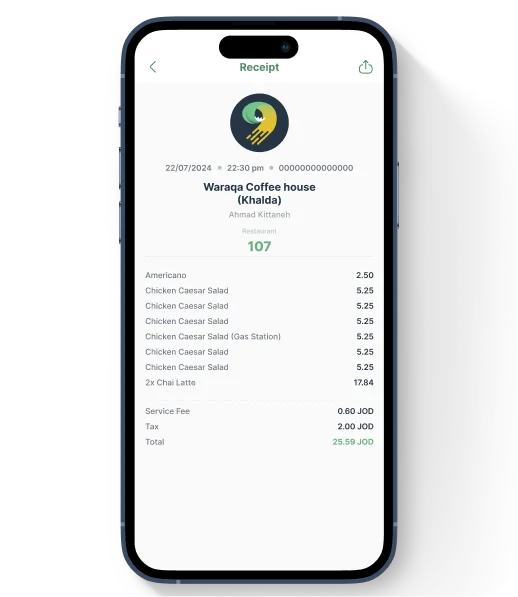
Full digital receipt in the Waraqa app
Sent automatically after every purchase — no action needed from you or the customer.
Shows the store name, points earned, and receipt total in both English and Arabic.
The button links directly to the App to install and view the full digital receipt.
Using the Integration in the POS App
Assigning a Customer to Receive a Digital Receipt
To send a digital receipt to a customer, assign them to the sale in the Loyverse POS app before completing the transaction. The receipt and their earned points will be sent to their WhatsApp automatically.
The customer must have a phone number saved in Loyverse for Waraqa to send them a receipt.
Viewing and Redeeming Customer Points
You can view a customer's loyalty points balance and redeem their points directly from the Loyverse POS app at the time of purchase.
Pricing
$5 Free Credit to Start
Every new store starts with $5 in free credit. Use it to try the integration at no cost.
Small Business Friendly
Pay only for the receipts you send — a small per-receipt fee with no monthly minimum. Perfect for small stores.
Pay Only What You Use
Each receipt costs a small per-receipt fee based on your country — check the pricing page for your exact rate.
No Subscriptions, No Commitments
There's no monthly fee and no contract — you're only ever billed for the receipts you actually send. No surprise invoices.
Questions?
We're happy to help. Reach out to us at [email protected]